1 - Executive Summary
The zloader injector create a process called msiexec.exe using CreateProcessA. The injector will then inject an encrypted payload which also contains a small xor decryption stub into msiexec.exe. Then it will use SetThreadContext to point the remote thread inside msiexec.exe and use ResumeThread to wake up the thread to execute the decryption stub located at 0x90000, which will decrypt the PE-file and jump to a function at an offset of 36C0 from the base address of this decrypted PE-file.
1.1 - The Plan
This sample is named zloader.bin which is a .dll file given to us in the Zero2Auto course to enhance our unpacking skills. It contains a lot of anti analysis and also injects its payload into a remote process. So here is what we will do:
- Investigate injector / loader
- Retrieve payload injected into remote process
- Retrieve correct function offset where the remote thread will begin by looking at
SetThreadContext
- Investigate 2nd stager
- Use the offset retrieved from
SetThreadContextto find where the malware starts - Follow the normal Malware Loaders Guide note
- Use the offset retrieved from
2 - Stage 1: The Loader
Tip
Inside the tool “CFF Explorer” we can disable ASLR. Go to “Optional Header” → “DllCharacteristics” → “Click here” , then you can uncheck the box that says DLL can move to disable ASLR. Then save/overwrite original file. Makes life much easier.
2.1 - General Information
- Current Filename: zloader.bin
- Original Filename: antiemule-loader-bot32.dll
- SHA256:
C21FBF33FE025C03F38CE6190FD011F01A3E9C03D99ACD7648845C28CCBC3777 - Virustotal Score: 52/71
- Filetype: dynamic-link-library, 32-bit, GUI
- Filesize: 188 416 bytes
2.2 - Basic Static
2.2.1 - Strings
Based on the strings output, capa and pestudio the zloader.bin looks to be heavily obfuscated. However, there are still some interesting stuff to find:
antiemule-loader-bot32.dll: Is the original filename ofzloader.bin, and is also located under the export And some of the other interesting strings:
# Strings:
DllRegisterServer # function exported by COM DLLs, might use regsvr32.exe to execute inside x32dbg
GetCurrentProcess
GetCurrentProcessId
GetLastError
GetTempPathA
# Floss Decoded Strings:
ole32.dll
kernel32.dll
advapi32.dll # services & registry
wininet.dll  # networking such as HTTP, FTP, NTP etc.
ws2_32.dll   # networking
The above dll’s are related to COM objects, services, kernel & high/low level networking, which gives us indications into how this malware might behave.
2.3 - Code Analysis
2.4 - Dynamic Analysis
2.4.1 - Setup
- Disable ASLR as discussed earlier using CFF Explorer
- Rename
zloader.bintozloader.dll(for clarity) - Since we have the exported function
DllRegisterServer, we should use 32-bit version ofregsvr32.exethe instead ofrundll32.exeto avoid a potential stack misalignment and crash. Find the 32-bit version inside of SysWOW64 and load it into x32dbg by going toFile→Change Commandlineand then you should have this command:
"C:\Windows\SysWOW64\regsvr32.exe" C:\Path\To\Malware\Zloader\zloader.dll- Inside x32dbg, go to
Options→Preferencesand make sureUser DLL Entryis enabled - In the same view as in (4) above, go to
Exceptionsand choose Do no break to make sure the malware recieved exceptions as it normally would. - Run the file inside x32dbg until you hit the AddressOfEntryPoint inside of
zloader.dll
2.4.2 - Breakpoints
The only breakpoint for this injector that is necessary is actually:
IsDebuggerPresent: Change to “false” if hit (Or better, we can use the ScyllaHide plugin for x32dbg to do this automatically!)VirtualAlloc: Find the shellcodeVirtualProtect: To find theMZxdecompressed payload fileCreateProcessA: Find potentially created processesResumeThreadWriteProcessMemorySetThreadContext: Retrieve function offset where remote thread will begin insidemsiexec.exe
2.4.3 - Process Hollowing
The first breakpoint we hit after zloader’s entrypoint is the CreateProcessA as shown in the image below. There are a lot of interesting arguments to dissect here as marked inside the image.
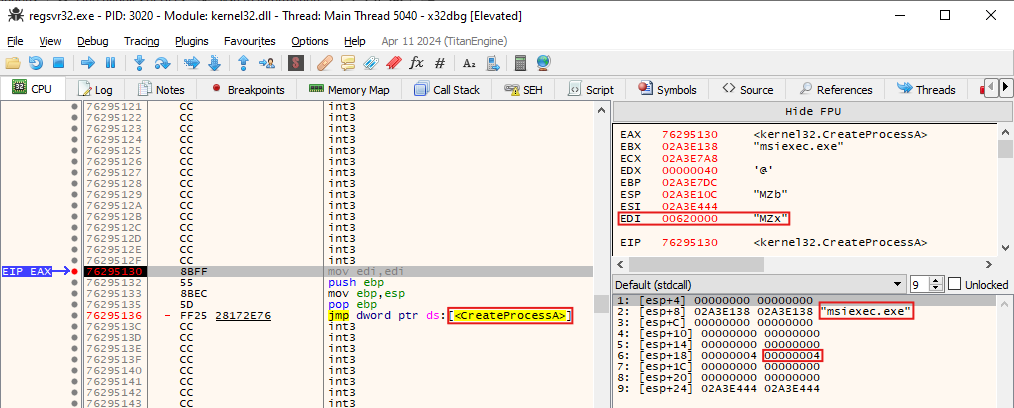
- Starting with the “MZx”, we can take a look at this memory location. What we find is only the fully formatted PE header, not the rest of the file.
- The second argument passed to
CreateProcessAis the name of the process that will be created;msiexec.exe - The sixth argument passed to
CreateProcessAis thedwCreationFlagswith a value of 4. This translated to CREATE_SUSPENDED, which means we might be looking at process hollowing
Now we can just run until our next breakpoint which is the WriteProcessMemory as shown below:

From the image above we have:
- Target location:
0x860000 - Payload:
0x2EFA7B0 - Size of payload:
0x2E000
We could dump this payload, but it looks like it is still encrypted. If we continue running the program, we will hit yet anoter WriteProcessMemory as seen below:

This time, the size is only 0x4A bytes and looking at the payload inside we have the decryption stub for the injected encrypted payload, this is most likely where the remote thread will start to decrypt the injected payload. The stub is shown below:
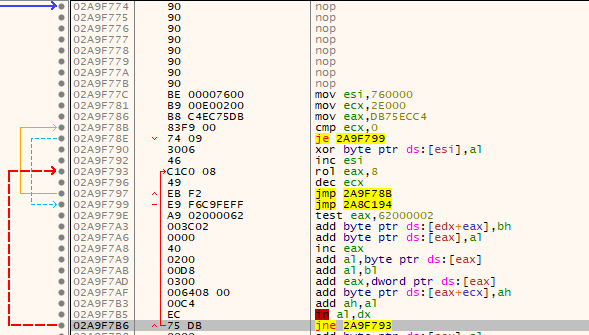
We can see that the XOR-key is stored inside of eax and is used to decrupt data stored at the location pointed to by esi. We will come back to this later. The next breakpoint is the SetThreadContext.
Finding the offset for the remote Thread
Since this malware will inject payload into the remote process msiexec.exe we can set a breakpoint at SetThreadContext. Then we can look at the stack variables where the 2nd argument pushed to the stack is the pointer to the CONTEXT structure. In the picture below, this is located at an address 0x2A9F484. Based on documentation about this structure, we can find the EIP offset at 0xB8 from the start address.
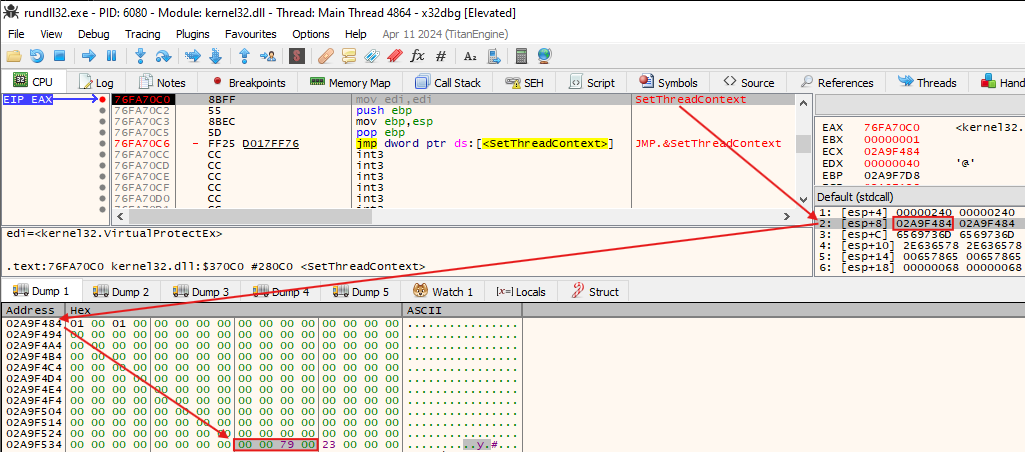
By adding 0xB8 to the beginning of the structure 0x2A9F484 we get 0x2A9F53C as seen in the picture above. The value here is 00 79 00 00 which (little endian) translates to 0x79000.
Now, if we attach another x32dbg to the child process msiexec.exe and look at the address 0x79000, we get the decryption stub we saw from the WriteProcessMemory earlier.
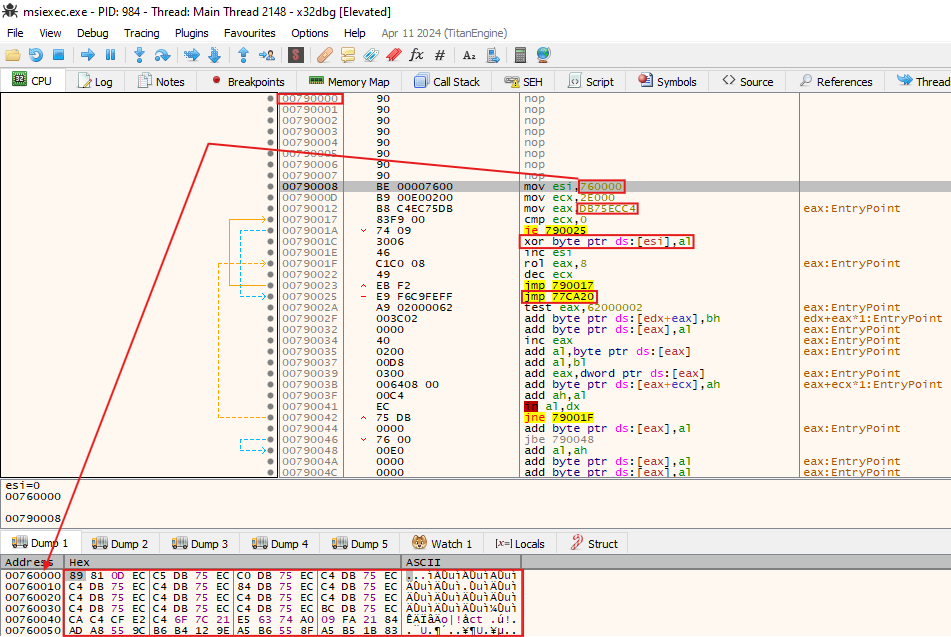
The remote thread will begin at address 0x790000, then XOR-decrypt the encrypted data located at address 0x760000 with a size of 0x2E000 bytes and the key is DB75ECC4 which is moved into eax on address 0x79012. Once decryption is done, it jumps to the address 0x77CA20. This is where we will analyze this 2nd stager payload inside IDA in the next section. Set a breakpoint on 0x790008 and 0x790023, then go back to our x32dbg for the zloader and execute until we hit ResumeThread. Then hit execute till return.
Now the EIP in x32dbg-msiexec should be at 0x790000. Once we have finished the decryption routine we should have this:
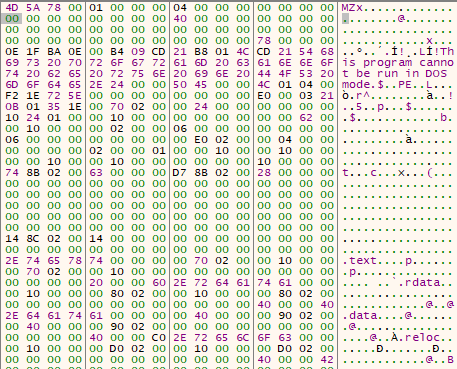
Now we can dump this out! Remember that the size is 0x2E000. By uploading this file to virustotal we can confirm that the file is malicious!
3 - Stage 2: The Payload
Remember that we have used the decrypted sample dumped using x32dbg! If you just load the sample from Zero2Auto you must decrypt it first!
3.1 - General Information
- Current Filename: 2nd_decrypted.dll
- Original Filename: antiemule-loader-bot32.dll
- SHA256:
16F69E588689AC4267C7DE9AC236DC79317F86B5A6D00F6D3E4781AB8081E062 - Virustotal Score: 29/73
- Filetype: dynamic-link-library, 32-bit, GUI
- Filesize: 188 416 bytes
3.2 - Basic Static
3.2.1 - Floss
There is not a lot of imports or strings. This might be an indication that this file is still packed.
# Strings
DllRegisterServer
GetCurrentProcess
GetCurrentProcessId
GetLastError
GetTempPathA
# Decoded strings
ole32.dll
kernel32.dll
advapi32.dll
wininet.dll
ws2_32.dll
3.3 - Code Analysis
3.3.1 - Finding the Actual Entrypoint
Warning: I had to redo this part, so my addresses changed from the previous explanation. However, this does not change the method! And you would most likely have some other addresses anyway ;)
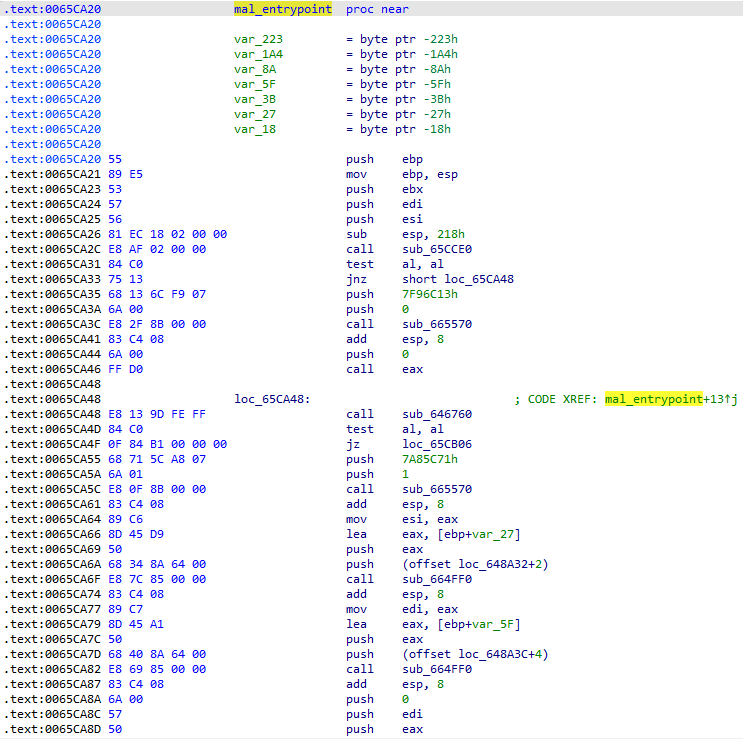
Since the 2nd stager begins at 0x7600000x640000 and the thread starts its execution at 0x65CA20 this is an offset of 0x1CA20, wich means we need to add this offset to our base address inside IDA Pro to find the correct thread entry! To make it easier, let’s rebase IDA. Go to Edit → Segments → Rebase Program → check Image base → set value to 0x640000 → OK. Now everything should be easier!
So, with that in mind. Lets open the 2nd_decrypted.dll up in IDA and rebased the program to make it correct. Go to the address and do a Create Function or hit the shortcur P. Then we can rename this function to mal_entrypoint as shown below:
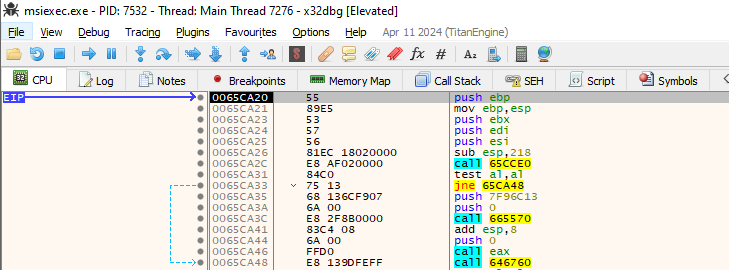
To compare IDA to x32dbg, here is the equivalent code inside of x32dbg-msiexec:
3.3.2 - API Resolver
- Retrieve PEB via TEB, using
fs:[30] - Access the
Ldrmember of PEB viaeax+0xC. TheLdrmember is a pointer to a PEB_LDR_DATA structure that contains information about the loaded modules for the process. - Access
InMemoryOrderModuleListto get a list of modules in the order in which they were placed in memory. - Puts
BaseDllNameinto esi. This specifies a pointer to a module name. - Using HashDB we found the hashing algorithm to be
carbanak